
Malfunction Report :
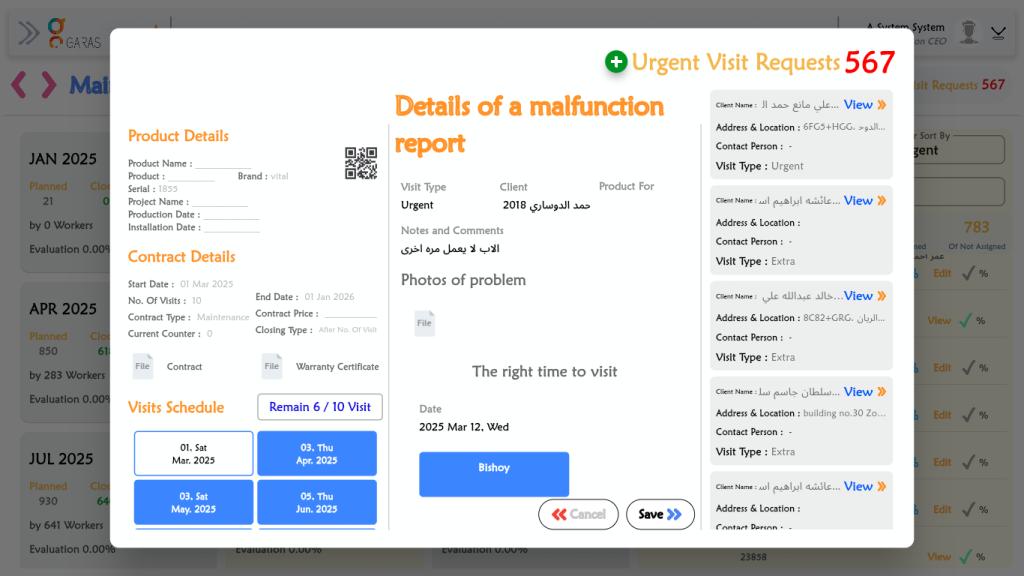
Review Report Details: The user first reads the information about the malfunction itself, located on the right side of the pop-up.
Visit Type: Urgent
Client: حمد الدوسري 2018 (Hamad Al-Dosari 2018)
Notes and Comments: “العاب لا يعمل مره اخرى” (The games don’t work again)
Photos of problem: Checks for any attached files.
Check Linked Product & Contract: The user looks to the left side to see which product and contract this report is associated with.
Product Serial: 1855
Contract Type: Maintenance
End Date: 01 Jan 2026
Verify Visit Status: The user checks the “Visits Schedule” section to understand the contract’s remaining services.
Status: “Remain 6 / 10 Visit”
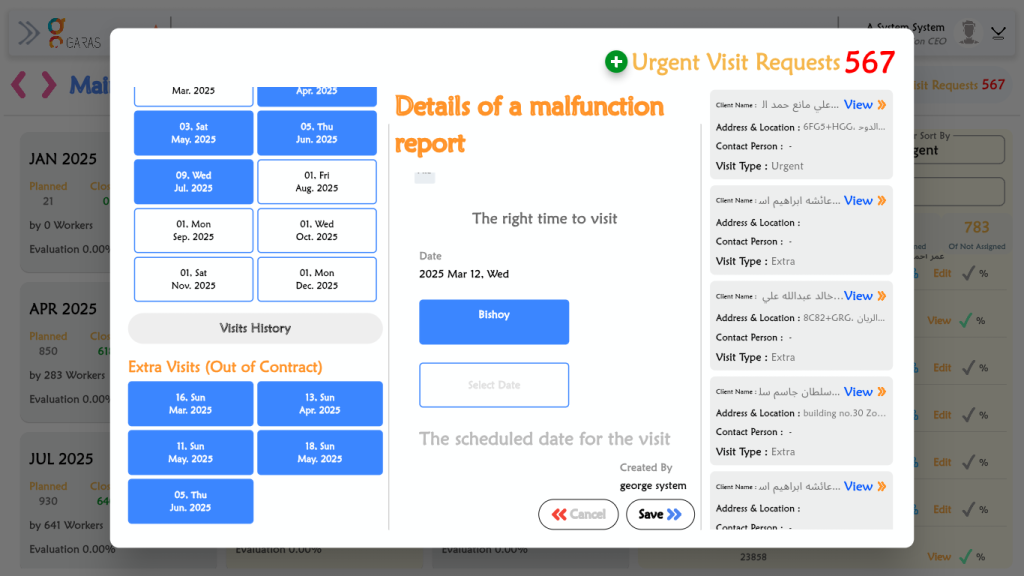
They can also scroll down to review any “Extra Visits (Out of Contract).”
Review Scheduling Information: The user looks back to the right to see the scheduling details for this specific urgent request.
The right time to visit (Requested by client): 2025 Mar 12, Wed
Assigned to: The user “Bishoy” is assigned.
The scheduled date for the visit: This field is currently blank, indicating the visit has not been formally scheduled yet.
Save or Cancel: After reviewing all the information, the user clicks Save (if they made changes, like adding a scheduled date) or Cancel to close the window.