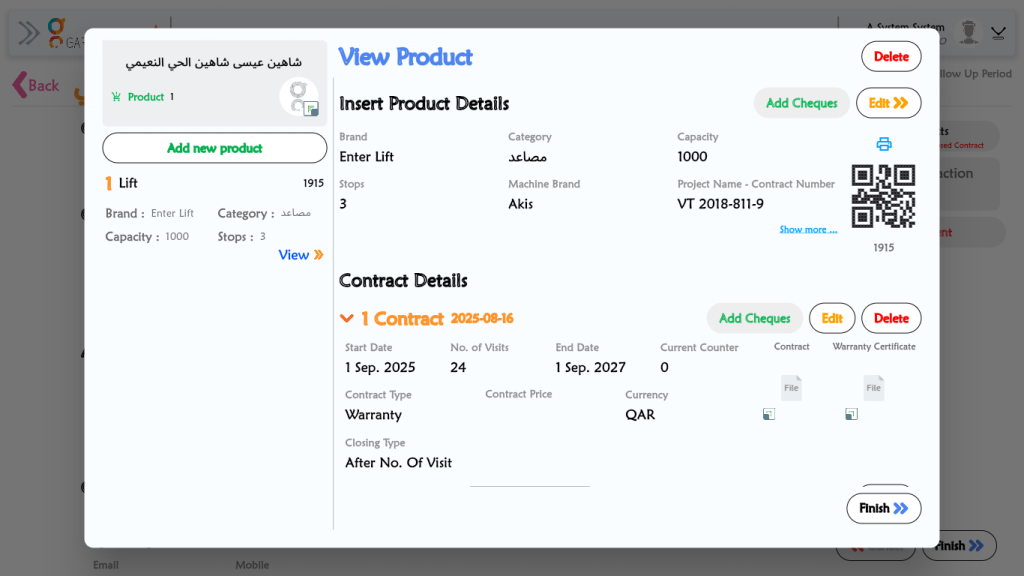
View Product Details: The user first reviews the main product information at the top, which includes:
Review Contract Terms: The user then looks at the “Contract Details” section to see the terms of the agreement.
Contract Type: Warranty
Start Date: 1 Sep. 2025
End Date: 1 Sep. 2027
No. of Visits: 24
Check Attached Files: While in the “Contract Details” section, the user can see and access the attached files for the Contract and the Warranty Certificate.
Examine Visits Schedule: The user scrolls down (as shown in the second image) to the “Visits Schedule” section.
Access Contract Actions: From this view, the user has several options to manage the contract, such as “Close Contract”, “Renew Contract”, or check the “Visits History”.
Finish: Once they have finished reviewing all the details, the user clicks the Finish button to close this window.